
Medication tracking · Android
Dose Tracker
Take your medicine on time, with zero stress.
Dose Tracker keeps medicines, daily doses and history in one place on your phone. Profiles, medicines, schedules and the record of what was taken are stored in the app’s private device storage, so the whole thing works without an account and without a connection.
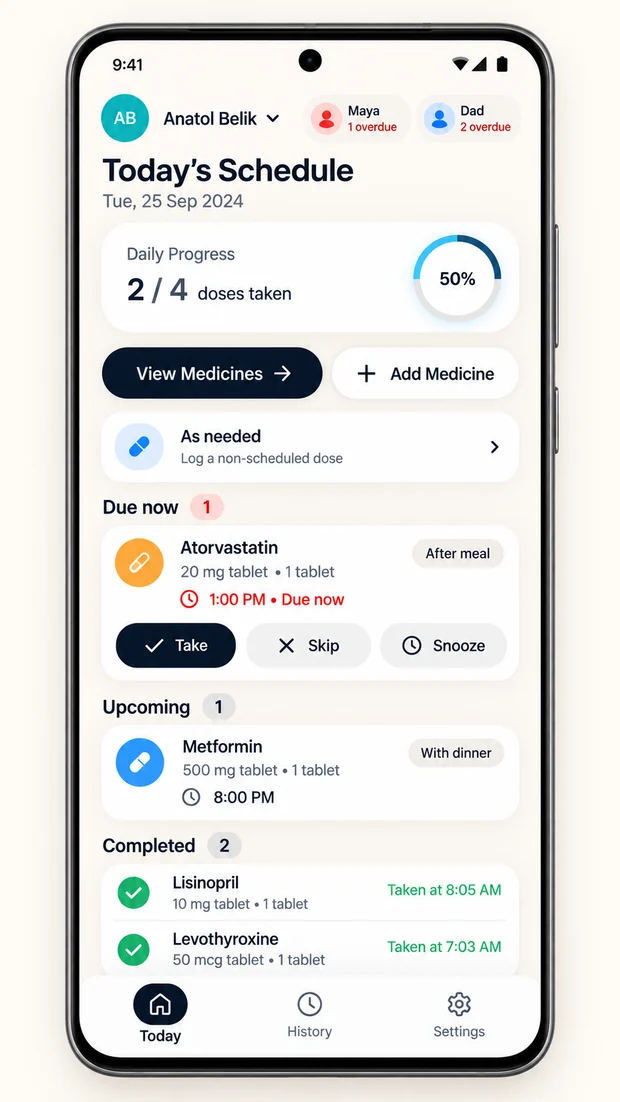
It is built for the household rather than the individual: colour-coded profiles for parents, children or pets, each with its own schedule, pill count and dose history, and an overdue badge in the profile switcher when someone has missed one.
- Free to use
- No advertising
- Works without internet
- Android 8.0 and newer
What it does
What it keeps track of
Local health records
Profiles, medicines, schedules, and history are stored in the app’s private device storage.
Optional local reminders
Set reminders for ongoing daily or weekday schedules starting today.
Family & caregiver profiles
Keep your parents, kids, or pets organised with separate colour-coded profiles, each with its own photo and avatar colour.
Refill & stock alerts
Recording a taken dose reduces the stock you entered. An in-app warning appears at or below your chosen threshold.
Fingerprint protection
Lock the app with your fingerprint or face recognition.
History calendar
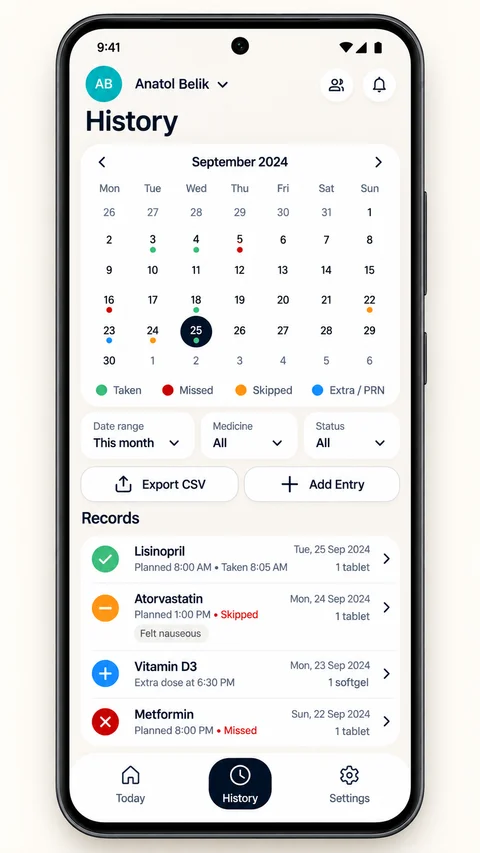
Review the doses you recorded in the history calendar, by day or across the month.
Notification privacy
Choose whether reminders show medicine details, or replace them with a generic message.
Gentle audio chimes
Two reminder sounds: Gentle Harmony, a soft melody, and Clear Chime, crisp and cheerful.
Made for
Who it is for
People managing a daily medicine routine, and the people managing someone else’s: a parent, a child, a pet, or all three from the same phone.
The site includes an interactive demo of the daily routine, where you can switch family profiles, record an afternoon dose and hear the reminder chime before installing anything.
Your information
Manage your information on your device
Health information is sensitive, so it is worth knowing the controls and their limits before you enter any.
No account to create
No email, phone number, or passwords required. Records live in the app’s private storage on your phone.
App lock and notification privacy
Optional biometric app lock, plus a notification privacy setting that can hide medicine details. Your device’s own lock-screen settings also apply.
Local deletion
Confirm “Erase all data” in Settings to remove local records and cancel reminders. This also disables diagnostics.
Diagnostics are off by default
Optional diagnostics are off by default. If you enable individual categories, the selected error reports, diagnostic logs and performance traces are sent to Sentry.
What deletion does not reach
Previously sent diagnostic reports, support emails and exported copies are not removed by erasing local data. The privacy policy sets out the detail.
Worth knowing
- Dose Tracker is not a medical device. It does not diagnose, treat, cure or prevent any medical condition.
- Supported reminders are scheduled locally and do not need WiFi or mobile data. Permissions, notification channels, battery restrictions and device state can still delay or prevent delivery.
- Screens shown here are design previews. The final app appearance may differ.
Questions
Common questions
Do reminders work if I have no WiFi or cellular signal?
Supported reminders are scheduled locally and do not need WiFi or mobile data. Permissions, notification channels, battery restrictions, and device state can still delay or prevent delivery.
Can I track medicines for my parents, children, or pets?
Yes. You can create separate profiles for each family member or pet with their own photo and avatar colour. Each profile keeps its own schedule, pill counts, and dose history. If someone has an overdue dose, a red badge alerts you in the profile switcher.
Can other people see my medication names on my locked screen?
Medicine details are shown by default. In Settings → Notification privacy, choose Hide sensitive or No info to replace them with a generic message. Your device’s lock-screen settings also apply.
Is it really free? Are there in-app purchases or hidden fees?
Dose Tracker is 100% free with no in-app purchases, no subscriptions, and no advertisements. You get full access to all features, including family profiles and biometric app lock, with zero paywalls.
How do I delete my data if I no longer want to use the app?
Confirm “Erase all data” in Settings to remove local records and cancel reminders. This also disables diagnostics. Previously sent diagnostic reports, support emails, and exported copies are not deleted; see the privacy policy.